
Outsourcing marketing for IT companies,
based on our 15 years of experience in the field
based on our 15 years of experience in the field

YouTube has long outgrown the boundaries of a simple video hosting and entertainment platform. Today, it is one of the most powerful advertising platforms in the world, ideally suited for promoting both B2C and B2B segments through YouTube ads for business.
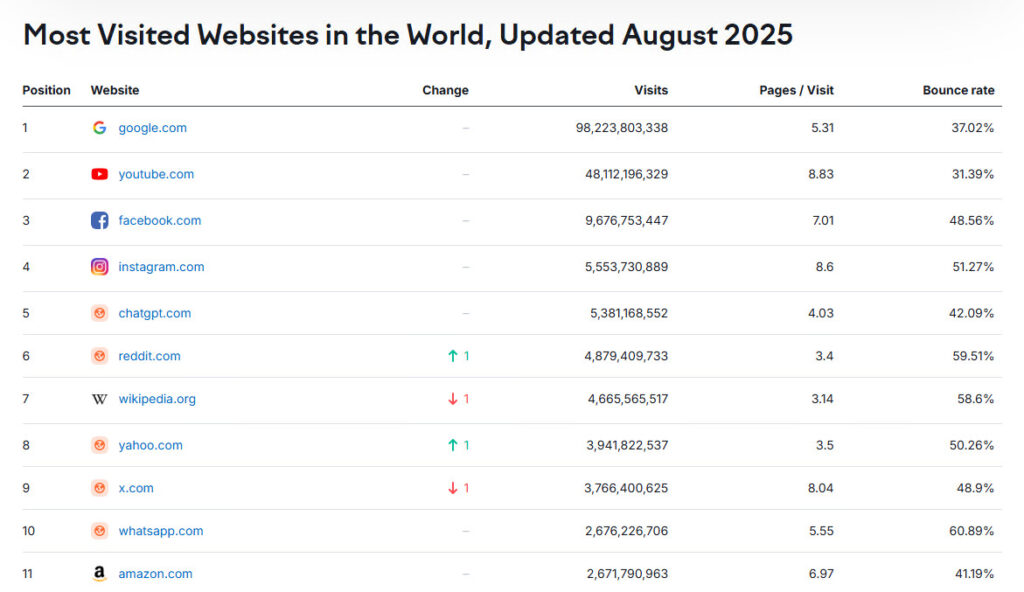
YouTube’s massive reach is driven not only by its own user base but also by its deep integration with Gmail and the Android ecosystem. A Google account is required for full access to YouTube, while the large number of active Android devices ensures seamless access to content anytime and anywhere. Together, these elements create a vast infrastructure for digital communication. At the same time, the absence of secondary features such as messengers allows YouTube to maintain a strong focus on its core function—video consumption.
The following table presents key audience and device metrics that clearly illustrate these interconnections.
| Number of active Gmail users | ~1.8–2.5 billion (22% of the world’s population and more) |
| Monthly active YouTube users (MAU) | over 2.70 billion |
| Number of Android devices / active Android users | ~3–4.2 billion |
Sources: SQ Magazine, DemandSage, WorldPopulationReview, Statista, and others. The value ranges are due to differences in measurement methodologies and evaluation systems.
For businesses, this means that YouTube ads for business offer not just massive reach, but direct access to a mobile, highly engaged, content-driven audience that is already prepared for various types of interactions – from purchasing consumer goods to making complex B2B decisions.
In this article, we take an in-depth look at why YouTube advertising has become so popular, which ad formats are available, how to set up an advertising campaign, how much it costs, and how to promote your channel and videos effectively. You will receive practical, actionable recommendations and answers to the most frequently asked questions from INTEG experts.
For more than 7 years, we have been helping businesses grow in domestic and international markets through digital marketing tools. Our portfolio includes 50+ completed B2B projects, among them 10+ projects for IT companies. Our clients range from businesses with annual revenues of $700K to $50M. Behind every project stands a team of experienced professionals capable of solving marketing challenges of any complexity—from comprehensive SEO strategies to large-scale, high-conversion digital campaigns.
By working with us, you gain access to a professional team as well as proven marketing strategies and proprietary methodologies that have no direct equivalents either in the local market or internationally.
Partnering with INTEG means real support and measurable results in the form of a steady flow of qualified leads and new high-value contracts.
Start promoting your business with INTEG
The uniqueness of YouTube lies not only in its large and diverse audience. YouTube is a full-fledged advertising ecosystem deeply integrated into Google Ads.
This integration allows advertisers to launch campaigns with precise targeting based on demographics, interests, job titles, location, and user behavior. At the same time, businesses gain flexibility in ad formats, from 6-second bumper ads to large-scale influencer integrations, making YouTube ads for business suitable for both brand awareness and performance-driven campaigns.
The platform stands out for its advanced technological capabilities and strong advertising potential. It is suitable for both large-scale brand campaigns and highly targeted B2B promotion. In terms of cost, advertising on YouTube remains more affordable than traditional media in most niches, often delivering higher efficiency at a lower price.
Video ad campaigns also allow advertisers to reach audiences beyond YouTube itself, displaying ads on Google’s partner video platforms within the Google TV network. As a result, YouTube delivers massive reach combined with highly accurate targeting powered by Google Ads, making it a uniquely effective marketing channel that stands out from other advertising platforms.
Looking for a data-driven YouTube promotion strategy with a clear budget and the right ad formats for your business? Leave a request, and we will prepare a tailored solution specifically for your company.
YouTube offers advertisers a flexible set of tools that can be tailored to the goals of any business, from increasing brand awareness to generating B2B leads.
All ad formats** share one key feature: they run through YouTube Ads within Google Ads, enabling precise control over impressions, audiences, and costs, making YouTube ads for business highly scalable and measurable.
Below is a brief overview of the main formats.
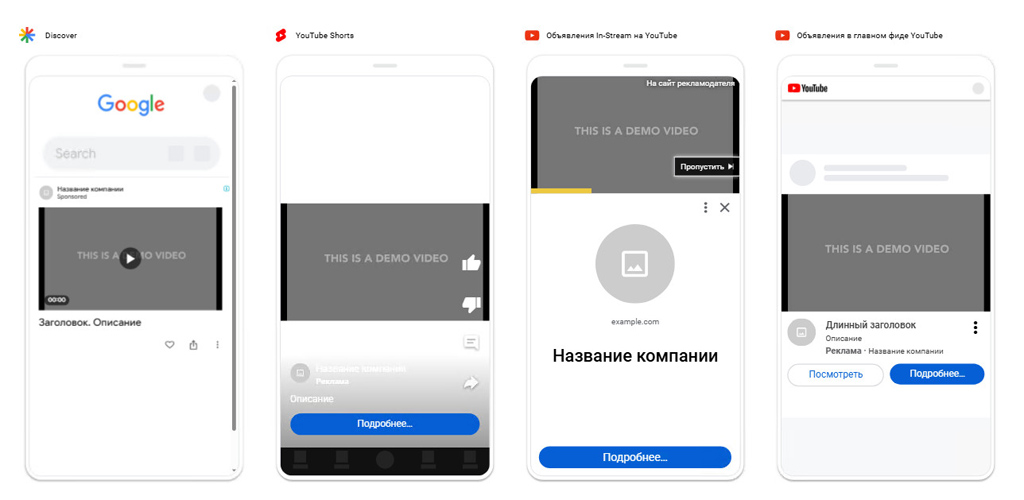
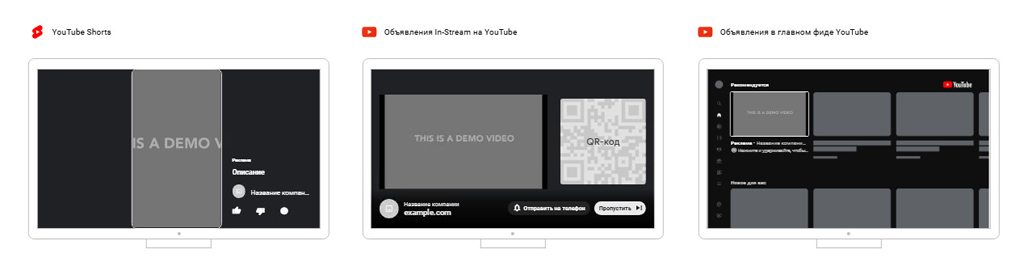
The classic format familiar to every YouTube user. Video ads can run before, during, or after the main content. There are two options:
The key feature of TrueView is that advertisers pay only for views—either when the viewer watches the ad to the end or for at least 30 seconds. This makes it highly convenient for budget optimization and effective for YouTube ads for business campaigns.
Bumper Ads are 6-second, non-skippable video ads. They are designed to increase brand awareness and work well as reminders or in sequential campaigns. According to Google research, bumper ads can boost brand awareness by 20–30% at minimal cost per impression.
These ads appear in YouTube search results, on the homepage, and alongside relevant videos. Users see a thumbnail and text and choose whether to click. This format is ideal for promoting educational videos, webinars, or product reviews.
Masthead ads allow advertisers to showcase native video advertising for a product, service, or brand on YouTube’s homepage feed.
Advertisers can choose between two payment options: CPM (cost per thousand impressions) and fixed rate per hour of display
Important: Masthead is a premium ad format available only through Google representatives and requires a significant budget. Prices vary depending on the market, season, and competition, ranging from tens of thousands to hundreds of thousands of dollars per campaign. Due to frequent changes in pricing conditions and the individualized approach to cost, it is recommended to confirm the exact price directly with a Google account manager when planning your campaign.
Banner formats that complement video content:
These formats work as supporting ads: they are less engaging than video ads but help retain audience attention and increase frequency of impressions, enhancing overall campaign effectiveness.
YouTube actively promotes the Shorts format (similar to Instagram Reels and TikTok videos). According to Google’s 2024 report, daily Shorts views exceeded 50 billion, and in 2025 this number grew to 200 billion (Neil Mohan, Cannes Lions). Advertising in short vertical videos is rapidly gaining popularity.
For businesses, Shorts ads offer a unique opportunity to reach a new audience segment that prefers quick, digestible content, making them a valuable addition to business YouTube ad strategies.
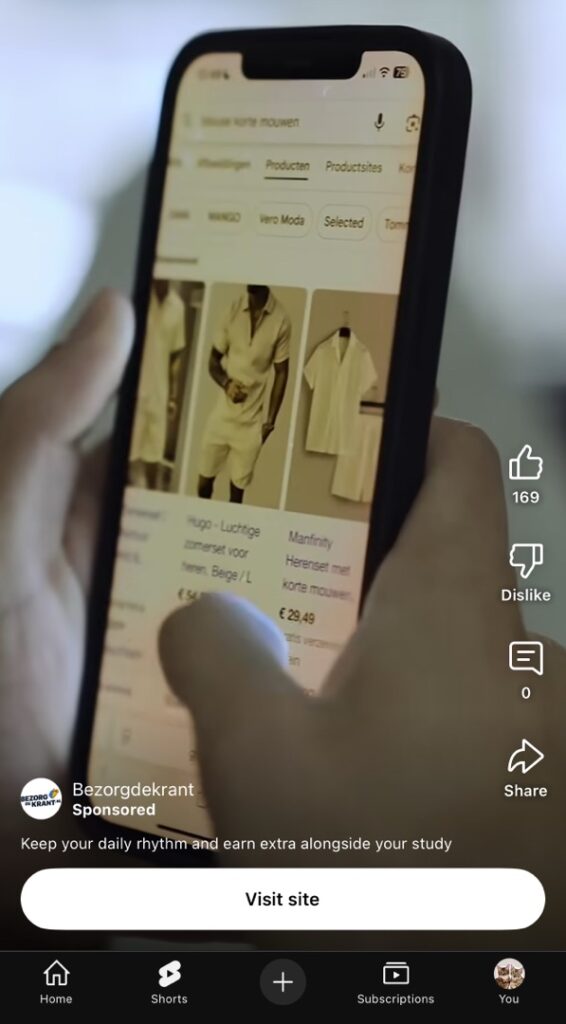
A specialized ad format optimized for mobile devices that is not used directly within the YouTube interface. Video ads using YouTube content can appear as Out-Stream ads outside of the platform on partner apps and websites, allowing advertisers to extend reach beyond YouTube while leveraging familiar video content for their campaigns.
| Format | Payment | Duration | Objective | Suitable For |
| In-Stream | CPV (просмотр) | 15–30 sec | Reach + Leads | B2B, e-commerce |
| Bumper Ads | CPM | 6 sec | Brand Awareness | FMCG, mass-market |
| Discovery | CPC | up to 2 min | Traffic, Engagement | Educational projects, IT |
| Overlay/Display | CPM | Static | Campaign Support | B2B + Branding |
| Shorts Ads | CPV/CPM | up to 60 sec | Young Audience, Engagement | Technology, Media |
| Out-Stream | CPM | up to 15 sec | Reach External Audience | Companies aiming for broad market coverage and cross-platform promotion |
Recommendation: If your goal is B2B lead generation, start with In-Stream (TrueView) ads and test Video Discovery simultaneously. Bumper Ads are best used for audience “warm-up” campaigns.
Keep in mind: ad formats can be used individually or as part of multi-format campaigns. The choice depends on your campaign objectives, budget, and target audience.
This format deserves special attention. Native advertising involves the organic integration of a brand or product into a creator’s content, so that the promotion feels like a natural part of the video rather than a separate ad.
This approach – without overt promotional calls-to-action helps avoid audience irritation, increase brand awareness, and build trust in the brand or product. The key factors are choosing the right channel and careful planning and calculations, which are essential for effective YouTube ads for business campaigns.
Before purchasing advertising on a channel, it is essential to assess the potential and effectiveness of the integration. First, key metrics are collected – audience reach, average watch time, number of clicks on links, and other indicators, which can be checked via specialized analytics tools or requested directly from the creator.
For example, a blogger may have an audience of 100,000 and report an average of 300 clicks on sponsored links. The advertiser evaluates this figure and forecasts conversion e.g., 20% of these clicks result in actual orders, yielding approximately 60 orders, of which around 40 lead to completed sales.
Next, the average transaction value is considered (let’s assume $1,200 per sale). Based on these numbers, the potential revenue can be calculated: 40 sales × $1,200 = $48,000.
If the cost of integrating with the influencer is $3,600, given these metrics, the business is likely to achieve a strong ROI, making it a profitable investment within a YouTube ads-for-business strategy.
When launching YouTube ads for business, it is essential to understand distribution channels and placements and how to use them to maximize campaign effectiveness.
Distribution channels are a broad concept that describes areas (or directions) where ads are shown within the YouTube + Google ecosystem. Placements are specific locations where ads appear within these channels. For example, in the channel “Video Content on YouTube,” individual videos or channels serve as placements.
There are three main distribution channels, each serving a specific purpose and suitable for different stages of the marketing funnel.
| Distribution Channel | Where the Video Ad Appears (Placements) | Objectives | Objectives |
| YouTube Search | Ads appear in search results alongside organic listings | Works well with high-intent queries branded or commercial searches when the user already has interest in the product/category and intent to purchase | Typically uses In-Feed ads, which are organically integrated into the interface |
| YouTube Video Content | Pre-roll, mid-roll, and post-roll within relevant videos and channels. Ads can also appear on the platform’s homepage and in recommendations (algorithm shows videos to users likely to click) | Provides broad reach; suitable for combining brand awareness and performance goals | Channels, topics, and even individual videos can be selected to ensure the ad feels highly relevant and contextual |
| YouTube Music | Ads are integrated into music videos and playlists | Suitable for promoting lifestyle and FMCG brands to the music service audience. For B2B (e.g., podcasts), separate testing is recommended | Uses standard video formats adapted for YouTube Music |
| Google Video Partners (GVP) | Ads are integrated into music videos and playlists | An effective channel for integrated campaigns | Supports remarketing and precise targeting |
Thus, when launching a campaign through Google Ads, advertisers first select distribution channels to reach their target audience at a broad level, and then refine their choices using placements to target the audience more precisely.
Understanding this hierarchy helps to plan campaign strategy and tactics effectively, balancing broad reach with precise ad placements for maximum impact.
Setting up YouTube ads for business is a multifaceted task that requires careful attention to detail. The main work is done in the Google Ads interface: here, you select your campaign objective, ad format, targeting, and bids, then upload your video (or use a URL) and launch the campaign.
This article cannot cover all the nuances and secrets of YouTube advertising. We provide general guidance to help you understand the process. However, you can always reach out to us if you have questions or need assistance with launching and optimizing your video campaigns. Our team supports you at every stage—from creative development and initial setup to detailed performance analysis and campaign optimization.
We don’t just launch ads – we carefully craft a strategy: we write the script and build a video funnel tailored to a specific product, designing a structured rollout. Typically, this involves a series of 7–10 logically connected videos that guide viewers from awareness to decision-making. After launching the campaign in Google Ads, we closely monitor performance metrics and optimize the funnel to improve subscriptions, leads, and sales at every stage.
Now, let’s provide a brief overview of the main steps to help you start managing your own YouTube ads for business campaigns.
Before setting up and launching a campaign, make sure you have:
The last two points will speed up the campaign setup and improve analytics accuracy.
Before configuring your campaign in Google Ads, select the primary objective (e.g., brand awareness, website traffic, lead generation) and create a Video campaign. The chosen objective determines available subtypes and optimization options (CPV/CPM/Target CPA, etc.), which are critical for running effective YouTube ads for business.
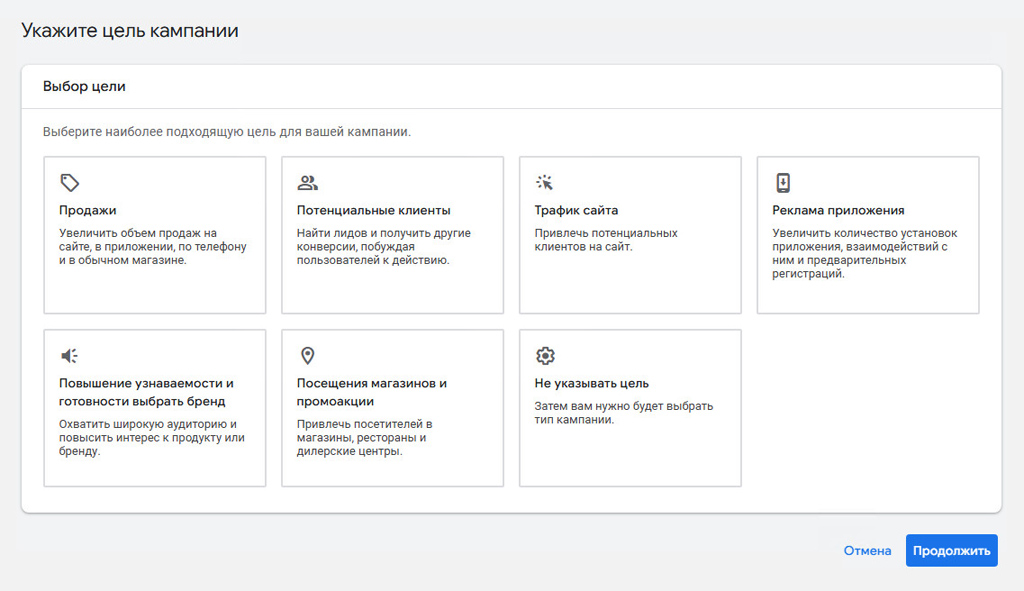
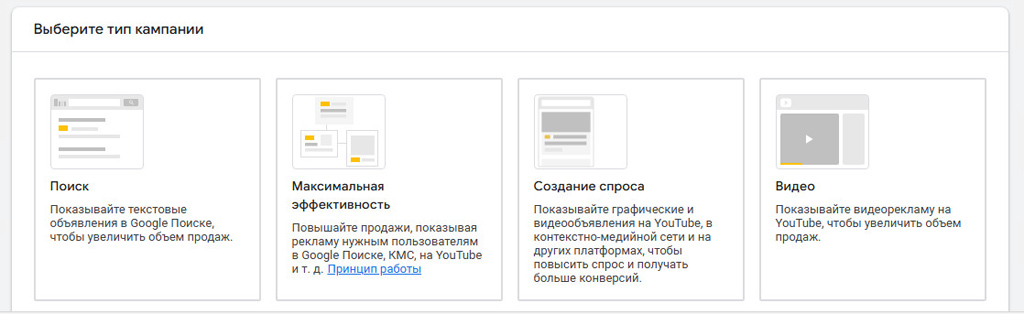
Note: Since July 2025, classic video campaigns (Video Action) have evolved. Google replaced them with Demand Gen campaigns. This is a more advanced campaign type that uses automated targeting, AI, and a multi-format strategy.
A single campaign may include:
The format adapts to the user’s device and placement.
In practice, this means reaching a broader audience with diverse behaviors and increasing conversion opportunities. According to forecasts, combining video and image ads can boost conversion rates by approximately 20% compared to older formats.
The main objective of Demand Gen campaigns is not to make an immediate sale, but to generate interest in a product or brand, warm up the audience, and gradually guide them toward action.
A Google Ads campaign has a hierarchical structure consisting of three levels, which help organize the campaign effectively and manage the budget efficiently.
The standard setup logic is: one campaign = one overall objective + several ad groups. Each ad group contains its own set of audiences and creatives.
In the initial iterations, it is recommended to test 2–3 creative variations and 2–3 audience segments.
Keywords are words and phrases that the system uses to match your ad with users’ search queries on Google.
Google Ads offers three main keyword match types, which affect reach and targeting precision:
Choosing and grouping keywords correctly allows you to show ads to users genuinely interested in your offer, balancing reach and relevance.
It is also important to use negative keywords — words or phrases you want to exclude from the campaign to avoid wasting budget on irrelevant traffic. For example:
ou can also set up conversion tracking (leads, calls, purchases). This allows the system to record these actions and optimize campaigns, enabling the use of automated bidding strategies to maximize results.
Available campaign targeting options include geography, demographics, interests/topics, keywords, remarketing audiences, and custom intent/look-alike lists. For B2B, it is advisable to use a combined approach. For example: demographics/geography + professional interests + remarketing/look-alike lists.
When creating an ad, choose a video from your linked channel or provide a URL, then add the title, CTA, and end screen. For specific features (e.g., view-based remarketing, tracking organic performance), it is helpful to link your YouTube channel with your Google Ads account. Instructions for linking can be found in Google’s support documentation.
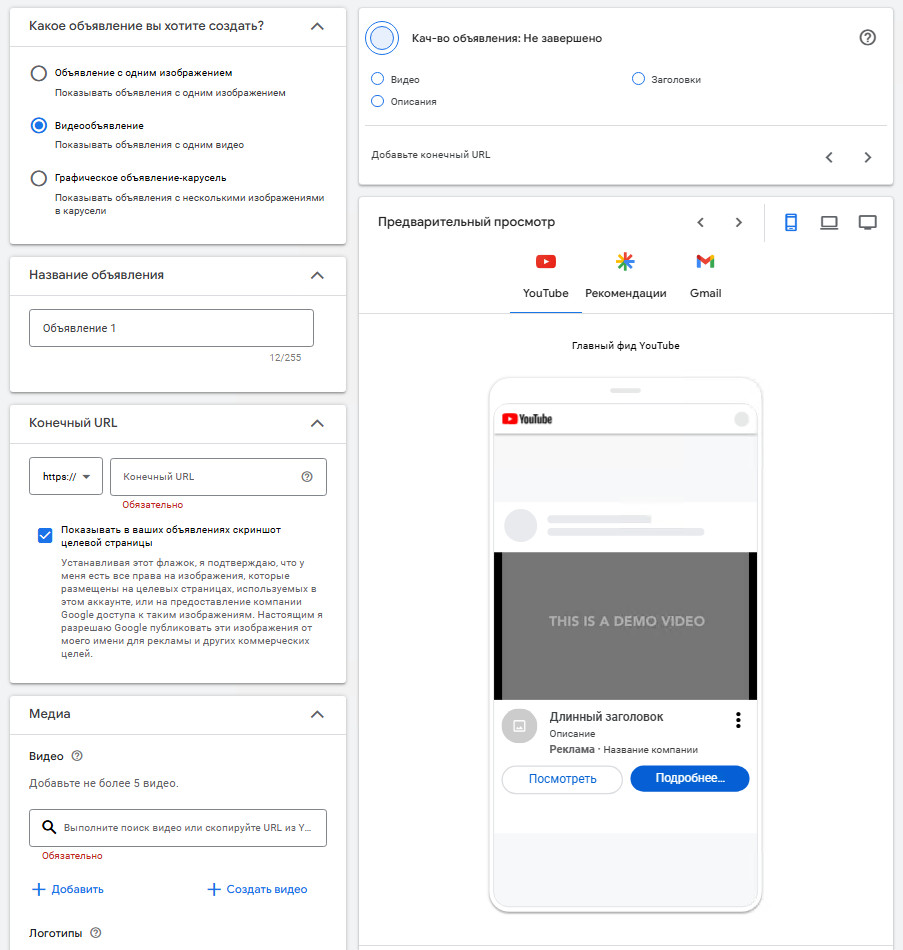
Choose a daily or total campaign budget and a bidding strategy. Available bidding options include:
If the main goal is brand awareness, CPM is commonly used. For lead generation, use Target CPA or Maximize Conversions.
Recommendation: Start with a test budget (minimum 7–14 days) to accumulate data and optimize effectively.
Test creatives, video length, and the first 5–10 seconds (hook). Pay attention to the following metrics:
It is almost always best to run 2–3 test variations simultaneously to determine which performs best in terms of media metrics and conversions, then scale the winning creative.
Recommendation: first, analyze audience response and relevance through basic metrics (VTR, CTR, watch time), then evaluate business effectiveness via CPL (cost per lead), ROAS (return on ad spend), and actual sales.
Connect conversion export to Google Ads, link your campaigns with GA4, and set up UTM parameters for destination URLs. Track view-through conversions (actions taken after viewing the ad) and interactions with elements (CTA clicks, subscriptions), as these affect pricing and optimization.
Recommendation: for B2B companies, it is essential to target industry-specific interests and channels, use long-form lead generation in video ads, and implement a sequence of touchpoints (start with a short awareness video, then follow up with a longer conversion-focused video). Essentially, you are creating a micro-funnel that gradually guides a potential client toward closing a deal.
Ensure your video meets technical and content requirements:
Detailed technical specifications can be found in Google Ads support.
If you want to maximize ROI for every dollar spent on advertising, contact INTEG for professional promotion! We offer influential creatives, precise targeting, and careful budget management, delivering a strategy that generates real contracts.
The cost depends on many parameters, primarily the following factors influence the price*:
The table below provides average benchmarks based on analytics from 2024–2025.
| Metric | Approximate Cost Range | Comment |
| CPV (for skippable In-Stream ads) | $0.01–$0.10 | Depends on niche and creative quality. Average ~$0.05–$0.08 for most niches. In expensive and competitive niches (especially in the USA, Canada, and other developed markets), CPV can be significantly higher ($0.30+). |
| CPM | $3–10 | In some niches (e.g., finance) can reach $15+. Average CPM (2025) is ~$3.5; higher for B2B. Affected by targeting and region. |
| View Rate (VTR) | ~30% | Varies depending on ad format. |
Comment. The figures above are approximate. In reality, CPV and CPM indicators may vary depending on the audience selection, creative quality, and current auction rate. Nevertheless, in terms of reach, YouTube remains the cheapest channel compared with, for example, Facebook (average CPM ~$8.1–8.2, and $10+ during holidays) and LinkedIn ($30–50+). In other words, the price on different advertising platforms is 3–10 times higher. For narrow segments on LinkedIn or in premium geographies (the US, Europe, and cities with populations over 1 million), the difference can be even greater. Yes, the reach is more accurate, but it is wider on YouTube. With a targeted, experience-based approach, you can set up your advertising campaign to achieve high performance and generate genuine leads.
| Criteria | Official Campaign via Google Ads (YouTube Ads) | Blogger Placement (Influencer Campaigns) |
| Targeting | Precise targeting by demographics, interests, behavior, geo, etc. | Limited to the blogger’s audience. Relevance depends on the channel’s niche and subscriber engagement. |
| Analytics | Transparent metrics: CPV, CPM, CTR, conversions; integration with Google Analytics; detailed reports. | Less transparent analytics; depends on data provided by the blogger and third-party tools. Wide variation in CPM/CPV. |
| Cost | Transparent metrics: CPV, CPM, CTR, conversions; integration with Google Analytics; detailed reports. | Usually fixed placement fees. Rates range from hundreds to tens of thousands of dollars depending on the blogger’s popularity, subscriber count, and views. Top bloggers with large, active audiences may charge hundreds of thousands of dollars. Occasionally, CPV/CPM or performance-based pricing is used; CPM can range from $2 to $30 depending on niche and subscriber quality. |
| Audience Trust | Lower; perceived as traditional advertising. | Higher, due to trust in the blogger and their recommendations. |
| Ad Format | All formats available through Google Ads for YouTube. | Native advertising (reviews, pre-rolls, product/service demonstrations, brand interactions, promo codes, sponsorship mentions, etc.). |
| How to Launch | Officially via Google Ads platform. | Direct agreement with the channel owner. Find suitable channels through marketplaces/aggregators (e.g., Epicstars, Bloggery, Perfluence for CIS). Aggregators allow viewing offers/statistics and placing ads without direct contact with bloggers. |
| Advantages | Maximum reach, precise targeting, reliable (except in regions with restrictions), transparent analytics. | High audience loyalty, native ad format, word-of-mouth effect. |
| Disadvantages | Requires professional expertise; poorly optimized campaigns can waste budget. | Analytics and transparency are lower; prices vary widely; careful selection and quality control of bloggers required. |
Need new contracts? Leverage the power of YouTube advertising! We can estimate a budget for your B2B product, propose the optimal strategy, and help set up campaigns precisely for your region and target audience.
Running ads is only half the battle. To ensure your videos consistently generate leads and sales, it is crucial to build a systematic channel promotion strategy. This involves a combination of:
SEO optimization of videos + organic promotion + paid campaigns.

When using paid methods, it is essential to allocate the budget correctly and choose a sound strategy. Here are a few tips:
Important! We do not recommend using paid promotion solely to gain subscribers or increase view counts. Experience shows that this leads to a complete loss of organic reach. Paid promotion should be applied only to specific product videos or to redirect the audience to other communication channels, such as Telegram.
Example of a video funnel. For a SaaS service specializing in document automation, you could launch:
Based on our practice, we can make a forecast. With this approach, over a period of 3–4 months, there is every chance to increase the number of subscribers by 1.5x+, reduce the average lead acquisition cost by 18–25%, and start receiving up to 20% of incoming leads from organic YouTube traffic.
For B2B businesses, YouTube can become a powerful promotion channel if you correctly choose the format, target specific goals (leads, sales, awareness), and test different creatives. Below are several successful cases from our practice.
A CRM system developer (SaaS company in the USA) tested YouTube video ads using the In-Stream (TrueView) format with pay-per-action. A 30-second video called for users to sign up for a free demo. With a $15,000 budget, the campaign generated over 2,200 leads at an average cost per conversion of $6.8. A 27% increase in CTR was also noted compared to search advertising.
A central marketplace used short 6-second Bumper Ads alongside retargeting via Google Ads. Within 2 months, the advertising campaign (AC) delivered a 12% increase in sales in the Fashion category. Additionally, post-campaign respondent surveys showed increased brand awareness.
The advertiser launched a series of educational videos highlighting the benefits of IT outsourcing and the cost savings from reduced technical support costs. The videos were launched in a sequence tailored to different stages of decision-making—from awareness to readiness for contact. With a budget of approximately €10,000, the campaign generated 47 qualified leads, with the average cost per lead at about €212. Within 6 months of launch (bearing in mind the long B2B decision-making cycle), 4 major new contracts were signed, resulting in 7% revenue growth.
A technology company promoting cloud services placed native integrations in reviews on two YouTube channels in the 'IT and Business' segment. The placement cost was approximately $6,250. As a result, the company received over 100 new leads via unique promo codes, and every dollar invested returned $2.6 in profit.
These tools allow you to reach users similar to your target audience and "catch up" with those who have already shown interest in your product/service/company.
Please note that prices in Europe and the USA are higher than in Latin American or Southeast Asian countries. Therefore, when planning a campaign, consider not only the format/strategy but also the placement region.
Don't waste time and money – let your YouTube advertising campaigns work for results! We can help you choose the right strategy and launch ads that save your budget while driving real sales.
* According to reviews from services such as SocialBlade, VidIQ, Backlinko, as well as marketing articles and analyses (Wyzowl, Backlinko, etc.).
** Source: benchmark reviews and Google Ads format documentation.


